
If you are running Google Ads to generate leads through your website, accurate conversion tracking is not optional. It is the backbone of every smart bidding strategy and every informed decision you make.
One of the most effective ways to improve your Google Ads conversion tracking is by enabling enhanced conversions. When set up properly with Contact Form 7 and Google Tag Manager, it gives you better data, stronger attribution and clearer reporting.
In this guide, we will walk through how to set up Google Ads enhanced conversions for Contact Form 7 using Google Tag Manager. We will also cover what has changed in recent years and why this matters even more in a privacy-first world.
What are Enhanced Conversions in Google Ads?
Enhanced conversions allow Google Ads to use first-party data that your users submit on your website, such as:
Email address
Phone number
First and last name
Address
This data is securely hashed before being sent to Google, which means it is transformed into an unreadable string. Google then uses that hashed data to better match conversions to signed-in users.
You can read the official overview here: About enhanced conversions – Google Ads Help.
Why This Matters in 2026
Third-party cookies are being phased out. Tracking is less reliable across devices and browsers. Smart bidding strategies such as:
Maximise Conversions
Target CPA
Target ROAS
depend heavily on accurate conversion data.
Enhanced conversions help:
Improve conversion accuracy
Strengthen cross-device tracking
Increase match rates
Feed better data into automated bidding
If you generate leads through Contact Form 7, this is one of the simplest upgrades you can make to improve your Google Ads performance.
When Does This Setup Apply?
This guide assumes:
Your website runs on WordPress
You are using Contact Form 7
You have Google Tag Manager installed
You already track form submissions as a Google Ads conversion
If you have not set up form submission tracking yet, this step-by-step guide explains how to track Contact Form 7 with Google Tag Manager: Contact Form 7 tracking with Google Tag Manager.
Step 1: Turn on Enhanced Conversions in Google Ads
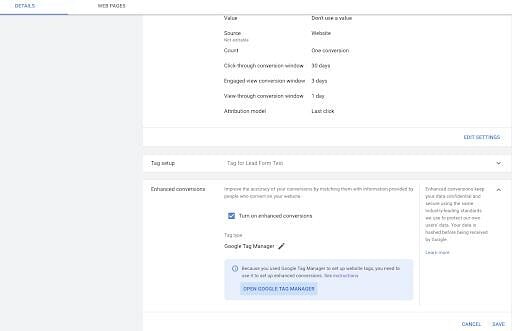
Log in to your Google Ads account
Go to Goals and select Conversions
Click on your existing form submission conversion action
Scroll to Enhanced conversions
Turn on enhanced conversions
Choose the option to use Google Tag Manager
Save your changes.
This step tells Google that you intend to send user-provided data securely with your conversion tag.
Step 2: Update Your Google Ads Conversion Tag in Tag Manager
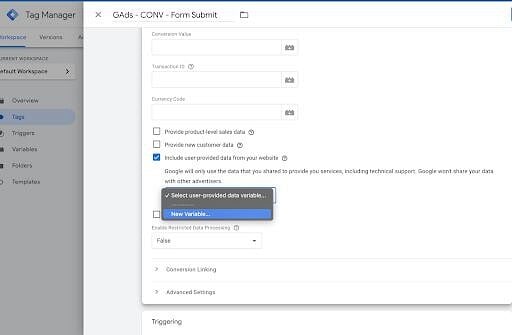
Open Google Tag Manager and locate your Google Ads Conversion Tracking tag for the Contact Form 7 submission.
Inside the tag settings:
Enable Include user-provided data from your website
Choose Manual configuration
You will now see fields for:
Email
Phone number
First name
Last name
Address
Do not guess these values. We will connect them properly using Data Layer variables.
Step 3: Test Your Contact Form 7 Submission
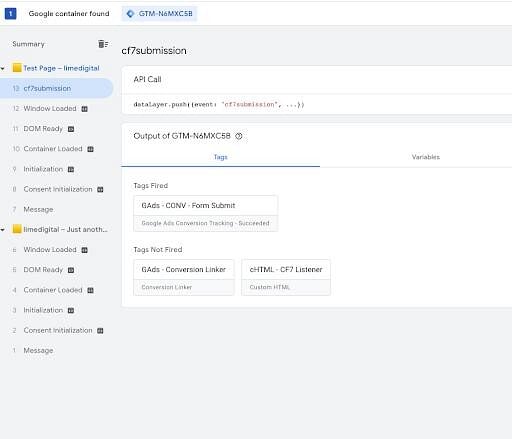
Before adding enhanced data, confirm:
The form submission triggers correctly
Your Google Ads conversion tag is firing
Use Preview mode in Google Tag Manager.
Submit a test form on your website and confirm that:
Your custom formSubmission event fires
Your Google Ads conversion tag triggers
If that is not working, fix this first. Enhanced conversions are an optimisation, not a replacement for correct base tracking.
Step 4: Understand The Contact Form 7 Data Layer
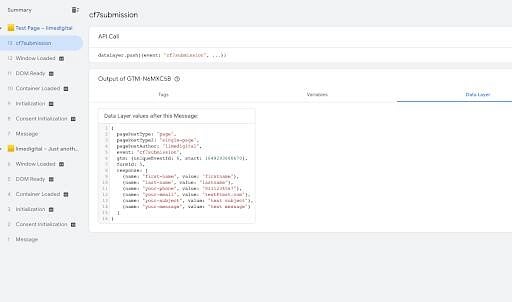
Contact Form 7 pushes form data into the data layer when set up correctly.
Typically, form field data is stored in an array, often under something like:
“response” : event.detail.inputs
Arrays are zero-indexed. This means:
The first field = index 0
The second field = index 1
The third field = index 2
For example:
response.0.value might be first name
response.1.value might be phone
response.2.value might be email
Your form structure determines the exact order. Always confirm in Preview mode.
Step 5: Create Data Layer Variables in Google Tag Manager
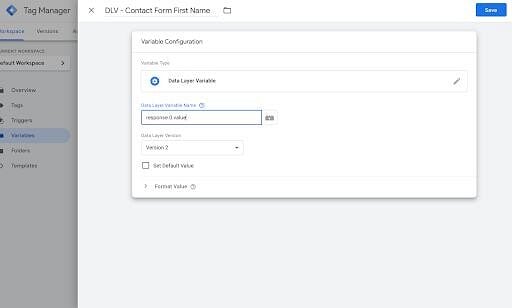
Now create a separate Data Layer Variable for each piece of information you want to send to Google Ads.
For example:
DLV – First Name → response.0.value
DLV – Phone → response.1.value
DLV – Email → response.2.value
Use:
Variable Type: Data Layer Variable
Data Layer Version: Version 2
Repeat this for each relevant field.
Keep the naming consistent and practical. If you have multiple forms with different field orders, you may need separate variable sets for each form.
Step 6: Connect The Variables to Enhanced Conversions
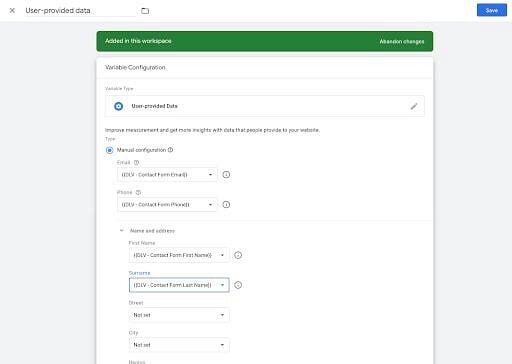
Return to your Google Ads Conversion tag in Tag Manager.
Under User-provided data:
Map Email to your Email DLV
Map Phone to your Phone DLV
Map First name and Last name if available
Double-check everything in Preview mode.
Submit another test form and confirm:
Variables are populated
Conversion tag fires
No errors appear
Once confirmed, publish your container.
Handling Multiple Contact Form 7 Forms
If your site has more than one form:
Use the formId in the data layer
Restrict your trigger to fire only for the correct form
Consider separate user-provided data variables per form
This avoids sending incorrect field mappings and corrupting your conversion data.
Privacy and Compliance Considerations
Enhanced conversions use first-party data that users intentionally submit. However, you must:
Have a clear privacy policy
Disclose the use of advertising and tracking technologies
Follow UK GDPR requirements
Google’s documentation outlines the data handling process in detail: About enhanced conversions – Google Ads Help.
Never implement enhanced conversions without aligning tracking with your legal and privacy obligations.
What Difference Does This Actually Make?
On paper, enhanced conversions improve match rate and attribution accuracy.
In practice, we have seen this translate into:
More reported conversions without increasing spend
Better performance from Target CPA campaigns
More stable results during browser and tracking changes
Higher confidence when scaling budgets
This is not a silver bullet. It does not fix poor targeting or bad landing pages.
It does ensure your Google Ads conversion tracking reflects reality more accurately, which gives automated bidding the data it needs to perform.
Final Thoughts
If you are investing in Google Ads lead generation and using Contact Form 7, enhanced conversions should be standard.
It is a practical upgrade. It is aligned with privacy-first tracking. It improves data quality.
At Online Advantage, we focus on getting the fundamentals right before chasing tactics. Accurate tracking sits at the core of every profitable Google Ads campaign. Without it, decisions are guesses.
If you are unsure whether your Google Ads conversion tracking is set up properly, start by reviewing:
Are all form submissions tracked?
Is Google Tag Manager firing cleanly?
Are enhanced conversions enabled and mapped correctly?
Get the tracking right first. Performance improvements follow from there.